

Tutorial
| How to
surf WebMasterQuest, to generate website
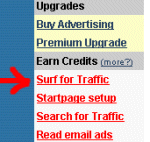
traffic: From within the WebMasterQuest member area menu, simply click on the red "Surf for Traffic" link, and you will instantly begin to earn credits towards your account. These credits can be used to promote your website(s), or alternatively can be exchanged for other forms of WebMasterQuest advertising, such as banners, email ads or "hotlinks". |
 |
Webmasterquest is the most responsive exchanges on the internet, with thousands of member websites in rotation, and advanced fraud protection. Every time you view a member website, you will earn credits towards your account. To insure that real people are viewing member websites, WebMasterQuest employs an advanced "anti-cheating" system. The WMQ Surfbar ... |
Whenever you surf to a new member website, a 20 second timer
will begin to count down to zero. You must wait until the
timer counts down to zero before you click the correct icon to
proceed to the next page. Every website that you visit generates a
new image that contains several pictures, and a matching image (shown in the red circles,
below), you must click the matching image to proceed to the next page and earn credits.  |
Clicking the correct icon choice insures that you will earn credits towards your account, and the next member website will begin to load. The more pages you surf, the more credits you earn! Every page that you display, will also be accompanied by a fresh banner, and a collection of hotlinks shown at the botom of the page (below).. |
Targeted website traffic ... Surf up as many credits as you wish, knowing that your website(s) will be placed into rotation, displayed in front of real and verified people. Wait for the timer to hit zero, and then make sure that you click the correct picture icon. When you no longer wish to surf for credits, then click on the 'My Account' link, and you will be returned to your WebMasterQuest account information area. |